Foreign Key

 Foreign Key


Foreign Key : – Foreign Key is a key in a table which is already defined as a primary/unique key in another/same table . Foreign Key create  Parent-Child relationship. It accept values of reference column from master table or null values


1) Foreign Key (Column Level) :-


a) With System defined name


SQL>create table courses (course_id number primary key,course_name varchar2(20));


SQL>create table student(regno number(10) primary key, name varchar2(10),dob date,course_id number

                     references courses(course_id));


b) With User defined name


SQL>create table courses (course_id number constraint pk_course_id primary key,course_name varchar2(20));


SQL>create table student (regno number(10) constraint pk_regno primary key, name varchar2(10),dob date,course_id number constraint fk_course_id references courses(course_id));


2) Foreign Key (Table Level) :-


a) With System defined name


SQL>create table courses (course_id number primary key,course_name varchar2(20));


SQL>create table student(regno number(10) primary key, name varchar2(10),dob date,course_id number, foreign key (course_id) references courses(course_id));


b) With User defined name


SQL>create table courses (course_id number constraint pk_course_id primary key,course_name varchar2(20));


SQL>create table student (regno number(10) constraint pk_regno primary key, name varchar2(10),dob date,course_id number, constraint fk_course_id foreign key(course_id) references courses(course_id));


3) Composite Foreign Key :-


a) With System defined name


SQL>create table courses (course_id number,course_name varchar2(20),primary key (course_id,course_name));


SQL>create table student(regno number(10) primary key, name varchar2(10),dob date,course_id number, foreign key (course_id) references courses(course_id));


b) With User defined name


SQL>create table courses (course_id number constraint pk_course_id primary key,course_name varchar2(20));


SQL>create table student (regno number(10) constraint pk_regno primary key, name varchar2(10),dob date,course_id number, constraint fk_course_id foreign key(course_id) references courses(course_id));


4) On delete set null :-


a) With System defined name


SQL>create table courses (course_id number primary key,course_name varchar2(20));


SQL>create table student(regno number(10) primary key, name varchar2(10),dob date,course_id number,foreign key (course_id) references courses(course_id) on delete set null);


b) With User defined name


SQL>create table courses (course_id number constraint pk_course_id primary key,course_name varchar2(20));


SQL>create table student (regno number(10) constraint pk_regno primary key, name varchar2(10),dob date,course_id number, constraint fk_course_id foreign key(course_id) references courses(course_id) on delete set null);


 5) On delete cascade :-


a) With System defined name


SQL>create table courses (course_id number primary key,course_name varchar2(20));


SQL>create table student(regno number(10) primary key, name varchar2(10),dob date,course_id number, foreign key (course_id) references courses(course_id) on delete cascade);


b) With User defined name


SQL>create table courses (course_id number constraint pk_course_id primary key,course_name varchar2(20));


SQL>create table student (regno number(10) constraint pk_regno primary key, name varchar2(10),dob date,course_id number,constraint fk_course_id foreign key(course_id) references courses(course_id) on delete cascade);


--------------------------HAPPY LEARNING -----------------------------


                                                                                                   **THANK YOU**

Check Constraint

 Check Constraint

Check Constraint : – Check constraint check the condition which is specify on the column that must be TRUE.


1) Check Constraint (Column Level) :-


a) With System defined name


SQL>create table student(regno number(10), name varchar2(10),dob date,course varchar2(10) check (course in ('MCA','BCA')));


b) With User defined name


SQL>create table student(regno number(10), name varchar2(10),dob date,course varchar2(10) constraint ck_course check (course in ('MCA','BCA')));


2) Check Constraint (Table Level) :-


a) With System defined name


SQL>create table student(regno number(10),name varchar2(10),dob date,course varchar2(10), check (course in ('MCA','BCA')));


b) With User defined name


SQL>create table student(regno number(10),name varchar2(10),dob date,course varchar2(10),constraint ck_course check (course in ('MCA','BCA')));


3) Composite Check Constraint :-Check constraint defined for more than one column is called Composite Check Constraint.


a) With System defined name


SQL>create table student(regno number(10),name varchar2(10),dob date,course varchar2(10),check (course in ('MCA','BCA') and regno>1000));


b) With User defined name


SQL>create table student(regno number(10),name varchar2(10),dob date,course varchar2(10), constraint ck_regno check (course in ('MCA','BCA') and regno>1000));


--------------------------HAPPY LEARNING -----------------------------


                                                                                                   **THANK YOU**

Unique Key

Unique Key


Unique Key : – Unique Key does not allow duplicate value but it accept NULL value many times (As every null is unique and never equal to another null).


1) Unique Key (Column Level) :-


a) With System defined name


SQL>create table student(regno number(10) unique, name varchar2(10), dob date, course varchar2(10));


b) With User defined name


SQL>create table student(regno number(10) constraint uk_regno unique,

                     name varchar2(10),dob date,course varchar2(10));


2) Unique Key (Table Level) :-


a) With System defined name


SQL>create table student(regno number(10),name varchar2(10),dob date,course varchar2(10), unique(regno));


b) With User defined name


SQL>create table student(regno number(10),name varchar2(10),dob date,course varchar2(10),constraint uk_regno unique(regno));


3) Composite Unique Key :- Unique Key created for more than one column is called Composite Unique Key.


a) With System defined name


SQL>create table student(regno number(10),name varchar2(10),dob date,course varchar2(10), unique(regno,name));


b) With User defined name


SQL>create table student(regno number(10),name varchar2(10),dob date,course varchar2(10),constraint uk_regno unique(regno,name));                  


--------------------------HAPPY LEARNING -----------------------------


                                                                                                   **THANK YOU**

Primary Key

Primary Key 


Primary Key :- Primary key is a combination of NOT NULL and UNIQUE Key Constraint, Primary key never allow duplicate values and null values in the column.


1) Primary Key (Column Level) :-

a) With System defined name


SQL>create table student(regno number(10) primary key, name varchar2(10),dob date, course varchar2(10));


b) With User defined name


SQL>create table student(regno number(10) constraint pk_regno primary key,name varchar2(10),dob date,course varchar2(10));


2) Primary Key (Table Level) :-


a) With System defined name


SQL>create table student(regno number(10),name varchar2(10),dob date,course varchar2(10), primary key(regno));


b) With User defined name


SQL>create table student(regno number(10),name varchar2(10),dob date,course varchar2(10),constraint pk_regno primary key(regno));


3) Composite Primary Key :- Key, that is created for more that one column is called composite key. If Primary Key is created for more than one column then that Primary Key is called Composite Primary Key.


a) With System defined name


SQL>create table student(regno number(10),name varchar2(10),dob date,course varchar2(10), primary key(regno,name));


b) With User defined name


SQL>create table student(regno number(10),name varchar2(10),dob date,course varchar2(10),constraint pk_regno primary key(regno,name));


--------------------------HAPPY LEARNING -----------------------------


                                                                                                   **THANK YOU**

Primary Key and Foreign Key


Primary Key and Foreign Key

Difference between Primary Key and Foreign Key:-

Primary Key :- Primary Key is a column/columns in a table which can uniquely identify the records, it never accept duplicate value and never accept null values.

Foreign Key :- Foreign Key is a column/columns in table which is already defined as a primary/unique key in a another/same table.

1) Primary Key is used for uniquely identified the record where as Foreign key is to ensure the column values referenced from Primary key column

2) Primary Key never accept Null value where as Foreign Key accept Null Value

3) In a table only 1 Primary Key can be defined where as more than 1 foreign key can be defined in a table.

4) Primary never accept duplicate values where as Foreign accept duplicate records


Tablespace Management


Tablespace

Tablespace :- Tablespace is a logical term is Oracle. Every Tablespace attach with one or more datafiles.

Types of Tablespace
1) Permanent (Default)
2) Temporary
3) Undo

Data Dictionary for Tablespace:-

SQL>select * from dba_tablespaces;
SQL>select * from DBA_DATA_FILES;

Creation of Tablespace:-

1) Permanent :- 
Permanent tablespace is a tablespace where stored all data of tables and indexes.


SQL>create tablespace example datafile 'E:\APP\ORADATA\ORCL\example.DBF' size 20M;

SQL>create tablespace example datafile 'E:\APP\ORADATA\ORCL\example.DBF' size 20M AUTOEXTEND ON NEXT 10M MAXSIZE 100M;

SQL>CREATE TABLESPACE example1 DATAFILE 'E:\example1.DBF' SIZE 50M EXTENT MANAGEMENT LOCAL AUTOALLOCATE;

Note:-AUTOALLOCATE causes the tablespace to be system managed with a minimum extent size of 64K.The alternative to AUTOALLOCATE is UNIFORM. which specifies that the tablespace is managed with extents of uniform size. You can specify that size in the SIZE clause of UNIFORM.
If you omit SIZE, then the default size is 1M. The following example creates a Locally managed
tablespace with uniform extent size of 256K


SQL>CREATE TABLESPACE example2 DATAFILE 'E:\APP\ORADATA\ORCL\example2.DBF' SIZE 50M EXTENT MANAGEMENT   LOCAL UNIFORM SIZE 256K;

To Create Dictionary Managed Tablespace:-
SQL>CREATE TABLESPACE ica_lmt DATAFILE 'E:\APP\ORADATA\ORCL\example5.DBF' SIZE 50M EXTENT MANAGEMENT DICTIONARY;

Bigfile Tablespaces (Introduced in Oracle Ver. 10g):-

SQL>CREATE BIGFILE TABLESPACE example4  DATAFILE 'E:\APP\ORADATA\ORCL\example4.DBF' SIZE 10G;


2) Temporary :- TEMPORARY Tablespace is used for sorting , joining and grouping of data.

SQL>create TEMPORARY tablespace temp1 TEMPFILE 'E:\APP\ORADATA\ORCL\TEMP1.DBF' size 500M;

Multiple Temporary Tablespaces:-Create group by adding existing tablespace.

SQL>ALTER TABLESPACE temp TABLESPACE GROUP temp_ts_group;

Add a new tablespace to the group:-

SQL>CREATE TEMPORARY TABLESPACE temp2 TEMPFILE '/u01/app/oracle/TEMP2.dbf' SIZE 20M TABLESPACE GROUP temp_ts_group;

To see the tablespace group details:-
SQL>SELECT * FROM dba_tablespace_groups;
 
3) Undo TABLESPACE:- Undo tablespace is used for rollback segment.

SQL>create undo tablespace undo1 datafile 'E:\APP\ORADATA\ORCL\undo02.DBF' size 500M;

Alter command for Tablespace:-Alter tablespace command is used for adding new datafile to tablespace.

SQL>alter TABLESPACE example1 add datafile 'E:\APP\ORADATA\ORCL\example3.DBF' size 500M;
SQL>alter database datafile 'E:\APP\ORADATA\ORCL\example2.DBF' resize 200M;


Rename the tablespace:-

SQL>ALTER TABLESPACE example RENAME example_new;

Setting the default tablespace for users:-
SQL>ALTER DATABASE DEFAULT TABLESPACE users;

To see the default and temporary tablespace configured in system:-
SQL>SELECT * FROM database_properties WHERE property_name like '%TABLESPACE';

DROP Tablespace:- drop tablespace command is used to drop the tablespace.

SQL>drop tablespace example1;

Drop Tablespace with All Datafiles :-

SQL>drop tablespace example2 INCLUDING datafiles;
SQL>drop tablespace example3 INCLUDING CONTENTS AND DATAFILES;

Check How Many Datafiles in a Tablespace :-

SQL>SELECT file_name, tablespace_name FROM dba_data_files WHERE tablespace_name ='EXAMPLE1';

How to resize the Datafile to Minimum Size:-

SQL>alter database datafile 'E:\APP\ORADATA\ORCL\example5.DBF' resize 10M;


Other important information:-
SELECT * FROM V$LOG;                              --To know Redolog information
SELECT * FROM V$LOGFILE;                     --To know Redolog information
SELECT * FROM V$CONTROLFILE;          --To know control file information
SELECT * FROM V$PARAMETER;              --To know parameter file information


Classroom Practical -

--DATA DICTIONARIES FOR TABLESPACE AND DATAFILES INFORMATION --- 

SELECT * FROM DICT WHERE TABLE_NAME LIKE '%FILE%';
SELECT * FROM DBA_TABLESPACES;
SELECT * FROM DBA_DATA_FILES;
SELECT * FROM V$DATAFILE;
SELECT * FROM V$TEMPFILE;

----DATAFILES OPERATIONS-------

DROP TABLESPACE EXAMPLE;
DROP TABLESPACE EXAMPLE INCLUDING CONTENTS; 
DROP TABLESPACE EXAMPLE INCLUDING CONTENTS AND DATAFILES; 

CREATE TABLESPACE example 
      DATAFILE 'C:\ORACLE\ORADATA\ORCL\EXAMPLE2.DBF' size 10M;

CREATE TABLESPACE test1
      DATAFILE 'C:\ORACLE\ORADATA\ORCL\TEST01.DBF' SIZE 10M
      AUTOEXTEND ON
      NEXT 512K
      MAXSIZE 250M;

ALTER DATABASE DATAFILE 'C:\ORACLE\ORADATA\ORCL\TEST01.DBF' 
    AUTOEXTEND OFF;

ALTER DATABASE DATAFILE 'C:\ORACLE\ORADATA\ORCL\TEST01.DBF'
   RESIZE 20M;
   
ALTER DATABASE example 
      ADD DATAFILE 'C:\ORACLE\ORADATA\ORCL\EXAMPLE02.DBF' size 10M;

-----TEMPORARY FILES OPERATIONS------

DROP TABLESPACE TEMP02;
DROP TABLESPACE TEMP02 INCLUDING CONTENTS; 
DROP TABLESPACE TEMP02 INCLUDING CONTENTS AND DATAFILES; 

CREATE TEMPORARY TABLESPACE TEMP02 
      TEMPFILE 'C:\ORACLE\ORADATA\ORCL\TEMP02.DBF' size 10M;

CREATE TEMPORARY TABLESPACE TEMP03
      TEMPFILE 'C:\ORACLE\ORADATA\ORCL\TEMP03.DBF' SIZE 10M
      AUTOEXTEND ON
      NEXT 512K
      MAXSIZE 250M;

ALTER DATABASE TEMPFILE 'C:\ORACLE\ORADATA\ORCL\TEMP03.DBF' 
    AUTOEXTEND OFF;

ALTER DATABASE TEMPFILE 'C:\ORACLE\ORADATA\ORCL\TEMP03.DBF'
   RESIZE 20M;
   
----UNDO FILE OPERATIONS-------

DROP TABLESPACE UNDO02;
DROP TABLESPACE UNDO02 INCLUDING CONTENTS; 
DROP TABLESPACE UNDO02 INCLUDING CONTENTS AND DATAFILES; 
DROP TABLESPACE UNDO03 INCLUDING CONTENTS AND DATAFILES; 

CREATE UNDO TABLESPACE UNDO02 
      DATAFILE 'C:\ORACLE\ORADATA\ORCL\UNDO02.DBF' size 10M;

CREATE UNDO TABLESPACE UNDO03
      DATAFILE 'C:\ORACLE\ORADATA\ORCL\UNDO03.DBF' SIZE 10M
      AUTOEXTEND ON
      NEXT 512K
      MAXSIZE 250M;

ALTER DATABASE DATAFILE 'C:\ORACLE\ORADATA\ORCL\UNDO02.DBF' 
    AUTOEXTEND OFF;

ALTER DATABASE DATAFILE 'C:\ORACLE\ORADATA\ORCL\UNDO03.DBF'
   RESIZE 20M;
 

Oracle: Analyze Table or Index

 Analyze command 

We use "analyze" command to store fresh statistics of table or index . We can do the same DBMS_UTILITY package as well. Statistics created by "analyze" command or by DBMS_UTILITY package are used by CBO (Cost based Optimizer).

Some time same query taking huge time for execution, at that time we have to check that table or index used in query have latest statistics in data dictionary table or not, if not then we have to analyze table and index and re-execute the query .   

Below are commands syntax for same

Syntax:
For Table

analyze table <table_Name> {compute|estimate|delete) statistics;

For Index

analyze index <index_Name> {compute|estimate|delete) statistics ;

For Cluster

analyze cluster <cluster_Name> {compute|estimate|delete) statistics ;

Examples:-


DBMS_UTILITY package - If we want schema level or database level then we use this utility while we can use this utility for single table and single index as well

exec DBMS_UTILITY.ANALYZE_SCHEMA('SCOTT','COMPUTE');

exec DBMS_UTILITY.ANALYZE_SCHEMA('SCOTT','ESTIMATE', estimate_rows => 1000);

exec DBMS_UTILITY.ANALYZE_SCHEMA('SCOTT','ESTIMATE', estimate_percent => 25);

exec DBMS_UTILITY.ANALYZE_SCHEMA('SCOTT','DELETE');

exec DBMS_UTILITY.ANALYZE_DATABASE('COMPUTE'); 

PLSQL Performance Tuning DBMS_PROFILER


DBMS_PROFILER

DBMS_PROFILER - DBMS_PROFILER package is Oracle supplied package to tune PLSQL code.

Steps :- 1) Environment Setup (One Time Setup)
              2) Start DBMS_PROFILER then Execute PLSQL Package (Which need to Tune) then Stop the DBMS_PROFILER
              3) Analyze Profiler data
              4) Optimize PLSQL code then again repeat step 2)

1) Environment Setup :- a) Check DBMS_PROFILER Package available in SYS schema.

select object_name,object_type from all_objects where object_name like '%PROF%';

b) check that you are able to execute package DBMS_PROFILER from your user. if you are not able to excute then grant execute priviledge
on package DBMS_PROFILER from sys user to your user.

grant execute on DBMS_PROFILER to scott;

c) Create rquired table through 'proftab.sql'

@?/RDBMS/ADMIN/proftab.sql

d) check profile tables creates

select * from user_tables where table_name like '%PROF%';

PLSQL_PROFILER_RUNS
PLSQL_PROFILER_UNITS
PLSQL_PROFILER_DATA


2) Start DBMS_PROFILER then Execute PLSQL Package (Which need to Tune) then Stop the DBMS_PROFILER :-

exec DBMS_PROFILER.START_PROFILER('TEST');
exec procedure;
exec DBMS_PROFILER.STOP_PROFILER();


3) Analyze Profiler data :-

select * from PLSQL_PROFILER_RUNS;
select * from PLSQL_PROFILER_UNITS;
select * from PLSQL_PROFILER_DATA;


SELECT u.runid,
       u.unit_number,
       u.unit_type,
       u.unit_owner,
       u.unit_name,
       d.line#,
       d.total_occur,
       d.total_time,
       d.min_time,
       d.max_time
FROM   plsql_profiler_units u
       JOIN plsql_profiler_data d ON u.runid = d.runid AND u.unit_number = d.unit_number
WHERE  u.runid = 1
ORDER BY u.unit_number, d.line#;


-- Top 10 slow statements

SELECT * FROM (
select trim(decode(unit_type,'PACKAGE SPEC','PACKAGE',unit_type)||
 ' '||trim(pu.unit_owner)||'.'||trim(pu.unit_name))||
' (line '|| pd.line#||')' object_name
, pd.total_occur
, pd.total_time
, pd.min_time
, pd.max_time
, src.text
, rownum sequencenr
from plsql_profiler_units pu
,    plsql_profiler_data pd
,    all_source src
where pu.unit_owner = user
and pu.runid = &1
and pu.runid=pd.runid
and pu.unit_number = pd.unit_number
and src.owner = pu.unit_owner
and src.type = pu.unit_type
and src.name = pu.unit_name
and src.line = pd.line#
) where sequencenr <=10;


4) Optimize PLSQL code :-

PLSQL code need to modified with help of following  :-

Bulk Collection
Global Temporary Table
Inbuilt Functions
Nocopy Compiler Hint


Truncate sequence for Profiler tables data :-

truncate table PLSQL_PROFILER_DATA;
truncate table PLSQL_PROFILER_UNITS;
truncate table PLSQL_PROFILER_RUNS;

Installing Oracle Database 12c on Windows

Steps to Install Oracle 12c on Windows Server 2012

1) Go to database folder (Where Setup placed) . Right click on setup icon and click on "Run as Administrator"


2) You will get below window , click on "Yes"


3) On below window do un-check for  Received security updates 


4) Click on "Yes" for acceptance that you have not provided email address


5) Select "Skip for software updated"


6) Select First option for Installation of database software plus database creation
 

7) Select "Desktop class"


8) Choose option for Oracle Database owner


9) Provide the details for Oracle base ..etc


10) Click on "install"


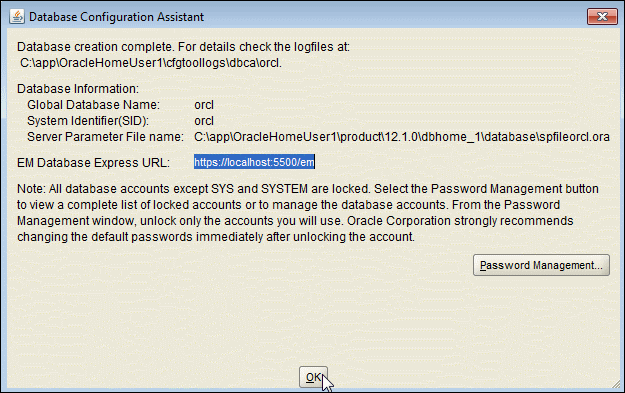
11) Click on Password Management and change the password for required users


12) Click on "Close" Installation completed


IBM Tivoli Netcool Omnibus Interview Questions & Answer

 IBM Tivoli Netcool Omnibus Interview Questions & Answer

Q1:-  Give The Brief Overview Of Netcool/omnibus?
Ans :- Netcool is a SLM tool which is used to monitor the real time networks, flow of data from one tool to another. It provides the consolidated view of the events generated on one screen collected from another tool. Netcool can gather various informations like server down alerts, CPU utilization high alerts, memory alerts, disk space, mount point full related alerts etc. etc.

Q2:- Name The Components Of Netcool/omnibus.?
Ans:-
     1)       The ObjectServer
     2)       Probes
     3)       Gateways
     4)       Desktop Tools
     5)       Administration Tools

Q3:- Define Object Server?
Ans:-The ObjectServer is the in-memory database server at the core of Tivoli Netcool/OMNIbus. Event information is forwarded to the ObjectServer from external programs such as probes and gateways.This information is stored and managed in database tables, and displayed in the event list.

Q4:- Explain The Process Of Deduplication In Object Server?
 

Ans:-Single server can generate the alert repeatedly until the problem is not resolved related to that alert.
            So deduplication is used by object server in Netcool/Omnibus.
            This process makes sure to avoid the multiple entries generated in the Event List.
            Therefore repeated events are collected, identified and updated as a single event.
            This process reduces the size of data as well.

Q5:- Define The Process Of Automation In Object Server?
 

Ans:-Automation can be done in object server which facilitates the user to detect changes in the object server and we generate responses to these changes. This help the admin that he will get to know about the changes done in the object server without taking any action.

Q6:- Define Probes In Netcool/omnibus?
 

Ans:-Probe is a java written code which works as a agent it connect to the source where there is possibility of generating an event. It detects it, collects it and forward the data to object server as events where it is displayed in event list.
            Probes are event source specific.
            Rules for the event detection and collection are define in the rules file.
            The event collected are updated in the table alerts.status.

Q7:- Define Gateways In Netcool/omnibus?
 

Ans:- Gateways are the intermediaries between the object server and the third party application such as databases for the exchange of events.
            Gateways can also be used to replicate events and to maintain the backup of object server.

Q8:- How We Can Import And Export Utility In Netcool?
Ans:-Import and export Tivoli Netcool/OMNIbus ObjectServer configurations to deploy duplicate Tivoli Netcool/OMNIbus systems in your network.
            Extract a subset of configuration items from Tivoli Netcool / OMNIbus Object Servers and import them into other ObjectServers.
            Save Tivoli Netcool/OMNIbus ObjectServer configuration data for backup purposes.

Q9:- What Are The Components Of Desktop Tools In Netcool/omnibus?
 

Ans:- The components are as follows:
            1) Conductor
            2) Event List
            3) Filter Builder
            4) View Builder

Q10:- How We Can Access Conductor In Netcool/omnibus?
 

Ans:-            For UNIX: From a command prompt, type: $NCHOME/omnibus/bin/nco &
            For Windows: From the Windows Start menu, click Netcool Conductor.
            Type your user name.
            Type your password
            The ObjectServer name defaults to NCOMS
            Click Ok.

Q11:- How We Start The Event List In Netcool/omnibus?
 

Ans:- For Unix:            From the Conductor window, click Event List in the button bar.
            From a command prompt, enter: $NCHOME/omnibus/bin/nco_event &

        For Windows:            From the Conductor menu, select Event List.
            From the Windows Start menu, select Programs ? Netcool Suite ? Event List.
            From a command prompt, enter: %NCHOME%omnibusdesktopNCOEvent.exe

Q12:- How We Can Open The Transient Event List From The Command Line?
 

Ans:-        For Unix:
            Open the transient event list by command: nco_elct

        For windows:
            Open the transient event list by command:NCOelct.exe

Q13:- How We Can Start The Transient Event List From The Command Line?
 

Answer :
        For Unix
            $NCHOME/omnibus/bin/nco_elct option

        For Windows
            %NCHOME%omnibusdesktopNCOelct.exe option

Q14:- Give The Steps To View Event List?
Ans:-Columns to include in the event list and the order in which they should be displayed
            Alternative titles or aliases for the columns
  Column formatting, including column widths, and alignment of the column headers and data
   Whether certain columns should remain in view at all times when scrolling horizontally across the event list
            Sort orders and the sort priority of the columns
            Whether to restrict the number of rows that are displayed in the event list

Q15:- Give The Steps To Start The View Builder?
Ans:-
From the event list, click View Builder on the toolbar, or select Edit ? Edit View.
            From the UNIX Conductor, click View Builder on the button bar, or double-click a saved view (.elv) file in the personal library.
            From the Event List Configuration window, click the New or Edit button.

Q16:- What Is Probes In Netcool/omnibus?
Ans:- Probe is a java written code which works as a agent it connect to the source where there is possibility of generating an event. It detects it, collects it and forward the data to object server as events where it is displayed in event list.
            Probes are event source specific.
            Rules for the event detection and collection are define in the rules file.
            The event collected are updated in the table alerts.status.

Q17:- What Is Gateways In Netcool/omnibus?
Ans :-Gateways are the intermediaries between the object server and the third party application such as databases for the exchange of events.
            Gateways can also be used to replicate events and to maintain the backup of object server.

IBM Tivoli Netcool Omnibus multiple choice Question and Answer

IBM Tivoli Netcool Omnibus multiple choice Question and Answer

Multiple Choice Q & A

1.A company is deploying a multi-tiered architecture with collection, aggregation, and display layers. Which stepsare required to create the primary and backup aggregation ObjectServers? 


A) Configure the omni.dat or Server Editor and generate the interfaces file for NCOMS_P, NCOMS_B and NCOMS_V.Run nco_dbinit with the -customconfigfile option to load the aggregation.sql and initialize the ObjectServer.Start the ObjectServers NCOMS_P and NCOMS_B.
 
B) Configure the omni.dat or Server Editor and generate the interfaces file for AGG_P, AGG_B and AGG_V.Run nco_dbinit with the -customconfigfile option to load the primary.sql or backup.sql and initialize the ObjectServerStart the ObjectServers AGG_P and AGG_B.
 
C) Configure the omni.dat or Server Editor and generate the interfaces file for AGG_P, AGG_B and AGG_V.Run nco_dbinit with the -customconfigfile option to load the aggregation.sql and initialize the ObjectServer.Start the ObjectServers AGG_P and AGG_B.
 
D) Configure the omni.dat or Server Editor and generate the interfaces file for NCOMS_P, NCOMS_B and NCOMS_V.Run nc o_dbinit with the -customconfigfile option to load the primary.sql or backup.sql and initialize theObjectServer.Start the ObjectServers AGG_P and AGG_B

2.The command nco_store_resize -newhardlimit 500mb changes which hard limit to 500MB? 


A) the memstoreoftheNCOMS ObjectServer
B) the amount of disk space available for the IBM Tivoli Netcool/OMNIbus installation
C) the memory footprint of any OMNIbus process
D) the amount of memory available to probe buffering

3.When configuring a Backup ObjectServer, what are the default property values for ActingPrimary andBackupObjectServer?

A) ActingPrimary is TRUE and BackupObjectServer TRUE
B) ActingPrimary is FALSE and BackupObjectServer FALSE
C) ActingPrimary is TRUE and BackupObjectServer FALSE
D) ActingPrimary is FALSE and BackupObjectServer TRUE
 
4.When upgrading probes, what does the UPGRADE.SH script do? 
 

A) It overwrites the probe older versions with the latest versions.
B) It reinstalls the probes and migrates data to the $NCHOME/omni bus/probes/mi grated directory
C) It migrates probes data to the $NCHOME/omni bus/probes/mi grated directory.
D) It configures the probe files (rules and props) with the latest available information
 
5.Which combination of properties can be used to enable an ObjectServer to serve files to a HTTP client? 
 

A) NHttpd.EnableHTTP, NHttpd.ListeningPort, NHttpd.SSLEnable, NHttpd.SSLListeningPort
B) NHttpd.AuthenticationDomain, NHttpd.SSLCertificate, NHttpd.DocumentRoot, NHttpd.EnableFileServing
C) NHttpd.DocumentRoot, NHttpd.EnableFileServing, NHttpd.AccessLog, NHttpd.EnableHTTP
D) NHttpd.EnableHTTP, NHttpd.ListeningPort, NHttpd.DocumentRoot, NHttpd.EnableFileServing

6.Which command line tool does the WebGUI administrator use to export and import portal data? 


A) export.sh
B) webportal.bin
C) tipcli.sh
D) run_waapi

7.What are wires used for when developing a custom set of pages in the WebGUI portal? 


A) to link portlets in different workspaces
B) to allow the communication of information between two different users using the same custom portal page
C) to create a link to publish content from one page to another
D) to route or connect client-side events between source and target portlets

8.In the multi-tiered architecture, when an event is reinserted from the collection to the aggregation layer, what is the default deduplication behavior for severity? 


A) The severity is changed only if the incoming severity is higher than the existing severity.
B) Only closed events are reawakened on deduplication. The severity is changed only if the old severity is 0 (clear) and thenew severity is greater than 0 (not clear).
C) The Severity field is always updated on deduplication. The severity from the collection layer will overwrite the severity atthe aggregation layer.
D) The Severity field is never updated on deduplication. The severity from the collection layer is dropped and the severity atthe aggregation layer is kept unchanged.
 
9.The WAAPI host, port, username, password is configured in which file? 
 

A) $NCHOME/omnibus_webgui/etc/waapi.init
B) $NCHOME/omnibus_webgui/waapi/etc/server.init
C) $NCHOME/omnibus_webgui/etc/server.init
D) $NCHOME/omnibus_webgui/waapi/etc/waapi.init

10.The optional nco_security section of a ProcessAgent config file is used for what? 


A) to list commands/binaries that the ProcessAgent will run from a remote request
B) to configure how username/passwords are authenticated for incoming connections to that ProcessAgent
C) to configure a whitelist of all hosts that the ProcessAgent will accept incoming connections from
D) to list usernames/passwords that are required for authentication connections to other Process Agents

11.Review the output from a rules file syntaxcheck:What is the cause of this error? 


A) CustomerD is not a valid parameter.
B) A call to an undefined variable CustomerD was made on line 39 in the rules file.
C) CustomerD was not set properly in the rulesfile.
D) The CustomerD field does not exist in the ObjectServer NCOMS_P.
 
12.An ObjectServer has been set up to create checkpoint files, and a utility is available to check the validity of the checkpoint files. Which command checks the files? 
 

A) nco_storepoint
B) nco check_store
C) nco_check_file
D) nco_checkpoint

13.A consultant is working on an IBM Tivoli Netcool/OMNIbus V7.2.1 ObjectServer upgrade to V7.4.Which high level steps migrate the key database? 


A) move the omni.kdb file to a temporary location, create a new key database with nc_gskcmd, import the certificates
B) move the omni.kdb file to a temporary location /nc_gskcmd withthe-load //omni.kbd
C) export the omni.kdb file to a flat file with nco_g_crypt -d, create a new key database with nc_gskcmd, import thecertificates
D) move the omni.kdb to a temporary location, perform the upgrade, move the omni.kdb into the$NCHOME/ etc/security/keys directory

14.A company is deploying a multi-tiered architecture with a collection, aggregation, and display layers. Which steps are required to create a pair of collection layer ObjectServers? 


A) Configure the omni.dat or Server Editor and generate the interfaces file for COL_P_1, COL_B_1 and COL_V_1Edit the properties file for COL_P_1 and COL_B_1 to specify the ObjectServers as collection ObjectServers.Start the ObjectServers COL_P_1 and COL_B_1.
 
B) Configure the omni.dat or Server Editor and generate the interfaces file for COL_P_1, COL_B_1 and COL_V_1Run nco_dbinit with the -customconfigfile option to load the collection.sql to initialize the ObjectServers.Start the ObjectServers COL_P_1 and COL_B_1.
 
C) Configure the omni.dat or Server Editor and generate the interfaces file for COL_P_1, COL_B_1 and COL_V_1Run nco_dbinit with the -customconfigfile option to load the collection.sql.Start the ObjectServers COL_P_1, COL_B_1 and COL_V_1.
 
D) Configure the omni.dat or Server Editor and generate the interfaces file for COL_P_1, COL_B_1 and COL_V_1Start the ObjectServers COL_P_1 and COL_B_1.
 
15.What is the default location of the ObjectServer, probe, and gateway log files? 
 

A) $NCHOME/log
B) $OMNIHOME/omnibus/log
C) $NCHOME/probes/log
D) $NCHOME/omnibus/log

Answers :-

 
1-C    2-D    3-C    4-C    5-D    6-C    7-D    8-C    9-D    10-C    11-D
12-B    13-A    14-B    15-D